JD Ultra Live Dealer Games: How to Join a Table and Start Playing
What Are Live Dealer Games?
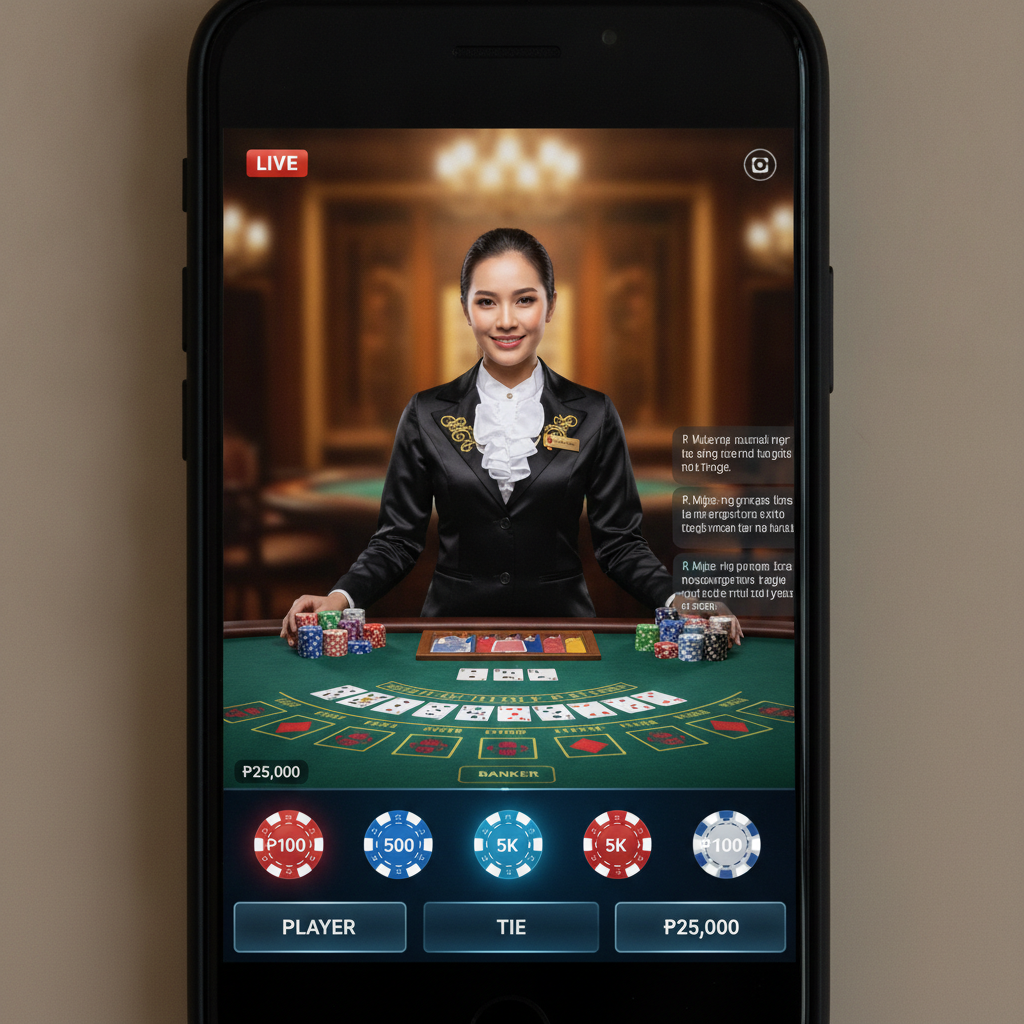
Live dealer games bring the casino floor to your phone or computer. Instead of software dealing cards or spinning a wheel, you watch a real person run the game through a video stream. You place bets on your screen, and the dealer handles physical cards, chips, and roulette wheels in a studio.
JD Ultra offers three main live dealer games popular with Filipino players:
Blackjack – The goal is to beat the dealer's hand without going over 21. You decide whether to hit (take another card), stand (keep your hand), double down, or split pairs. The dealer follows fixed rules for when to draw.
Baccarat – You bet on whether the Player hand, Banker hand, or a Tie will win. The dealer draws cards according to baccarat's traditional rules. No decisions are needed after you place your bet—just watch the outcome.
Roulette – The dealer spins a wheel and drops a ball. You bet on numbers, colors (red or black), odd or even, or groups of numbers. Payouts depend on how specific your bet is.
All three games stream in real time. You see every card dealt and every spin of the wheel, which many players prefer over computer-generated results.
How to Access the Live Casino Section on JD Ultra
Before you can join a live dealer table, you need an active JD Ultra account with money in your balance. If you have not yet signed up, complete JD Ultra registration and verify your ID. Then deposit pesos using GCash, Maya, or bank transfer through InstaPay or PESONet. Typical first deposits range from PHP 100 to PHP 500.
Once you have funds available:
- Log in to your JD Ultra account using your registered mobile number or email and password.
- Find the Live Casino tab on the main menu. On mobile, this is usually a button at the top or bottom of the screen. On desktop, look for a navigation bar with game categories.
- Tap or click Live Casino to open the lobby.
The live casino lobby displays thumbnail images of active tables. Each thumbnail shows the dealer, the game type, and the current table limit. You will also see a count of how many players are seated or watching.
Tables run 24 hours a day, so you can join at any time that suits your schedule.
Choosing a Table: Minimum Bets and Table Limits in Pesos
Live dealer tables at JD Ultra carry different minimum and maximum bet limits. The range helps both casual players and those with bigger budgets find a comfortable table.
Minimum bets typically start at PHP 50 or PHP 100 per hand or spin, though some VIP tables require PHP 500 or more. The minimum is the smallest amount you can wager in a single round.
Maximum bets cap how much you can place on one outcome. Standard tables may allow up to PHP 5,000 or PHP 10,000 per bet, while high-limit tables accept wagers in the tens of thousands of pesos.
Before you join a table, check the bet range displayed on the thumbnail or the table's information panel. If the minimum is higher than your budget, scroll to find a lower-stakes option.
How to pick a table:
- Match your budget – Choose a minimum bet you can afford for multiple rounds, not just one hand.
- Check how busy the table is – A table with fewer players may deal faster, but a crowded table can be more social.
- Look at the dealer language – Most dealers speak English, and some also speak Tagalog or greet players in Filipino.
Once you find a table that fits, tap the thumbnail to enter the game room.
Joining a Game, Placing Bets, and Interacting with the Dealer
When you join a live dealer table, your screen splits into two main areas: the video stream on top and your betting controls below.
Taking a Seat
Some tables require you to claim a seat before you can bet. You will see numbered seat positions; tap an empty one to sit. Other tables allow "bet behind," meaning you can place bets even if all seats are full by wagering on another player's hand.
If you are new, sitting at your own spot gives you full control over decisions in blackjack, while baccarat and roulette do not require seat-specific choices.
Placing Your Bet
- Wait for the betting window – The dealer announces when betting is open. A countdown timer appears on screen, usually giving you 10 to 20 seconds.
- Select your chip value – Tap the chip denominations at the bottom (for example, PHP 50, PHP 100, PHP 500) to choose your bet size.
- Tap the betting area – In blackjack or baccarat, tap your seat's betting circle. In roulette, tap the numbers, colors, or sections of the betting grid where you want to place chips.
- Confirm your wager – Some tables require a confirm button; others lock in your bet automatically when the timer runs out.
You can place multiple bets in roulette (for example, PHP 100 on red and PHP 50 on number 7) as long as your total stays within your balance and the table maximum.
Watching the Round
Once betting closes, the dealer begins the game:
- Blackjack – Cards are dealt to you and the dealer. You choose to hit, stand, double, or split by tapping the action buttons. The dealer will wait for your decision before moving to the next player.
- Baccarat – The dealer draws Player and Banker hands according to fixed rules. You simply watch to see which side wins.
- Roulette – The dealer spins the wheel and releases the ball. The camera follows the ball until it settles in a numbered pocket.
Results appear on screen immediately. Winnings are added to your balance automatically; losses are deducted. You can bet again as soon as the next betting window opens.
Interacting with the Dealer
Most live dealer tables include a chat box. You can type messages to greet the dealer, ask questions, or celebrate a win. Dealers often respond by name and may explain rules if you are confused.
Keep chat respectful. Abusive or inappropriate messages can result in being muted or removed from the table.
You can also tip the dealer if you have a good run. Tipping is optional and done by selecting a chip amount and placing it in the tip box on screen.
Leaving the Table
When you are finished playing, tap the exit or lobby button. Your remaining balance stays in your JD Ultra account, and you can return to the live casino lobby or switch to slots, sports betting, or other games.
There is no penalty for leaving mid-session. If you step away during a round, the dealer will act on your behalf according to default rules (in blackjack, this usually means standing on your current hand).
Tips for First-Time Live Dealer Players
- Start with baccarat or roulette if you want a simple game with no decisions after you bet. Blackjack requires basic strategy knowledge to play well.
- Watch a few rounds before betting. Most tables let you observe without placing a wager, so you can learn the flow.
- Set a budget before you join. Decide how many rounds you want to play and divide your deposit accordingly.
- Use the minimum bet for your first few hands while you get comfortable with the interface.
- Check your balance regularly in the account display at the top of the screen.
Responsible Gambling Reminder
JD Ultra live dealer games are for players aged 21 and over only. Playing casino games should be entertainment, not a way to make money or solve financial problems.
Set a deposit limit you can afford to lose, take breaks between sessions, and never chase losses by betting more than planned. If gambling stops being fun or begins to interfere with daily life, seek help from a responsible gambling support service.
Live dealer games move quickly, and it is easy to lose track of time and money. Keep control of your play and stop when you reach your limit.
Ready to try live dealer games? Log in to your JD Ultra account, head to the Live Casino section, and choose a table that matches your budget. Watch the dealer, place your bets, and enjoy the experience of a real casino from your phone.